
Learning can be fun. Yes, really! When you host Gimkit, you bring energy, joy, and teamwork into your classroom or home. Gimkit is a game-based learning platform that turns ordinary lessons into exciting challenges. Imagine your students or kids answering questions, earning virtual money, defending themselves in snowball fights, or teaming up for missions—all while mastering math, science, reading, or even history. That’s Gimkit!
But how do you actually host Gimkit? Is it for teachers only? Can families use it at home? Is it hard to set up? Don’t worry—we’ll answer all of that and more. In this beginner-friendly guide, we’ll teach you, step by step, how to host Gimkit and make learning something everyone looks forward to. Whether you’re working with a big class, a homeschool group, or just a few curious kids, this article will show you how to make the most out of this powerful, playful platform. Let’s explore the world of Gimkit and how you can host your very own game—in just a few clicks!
What Is Gimkit?
Gimkit is an online quiz-style game that makes learning feel like play. Created by a high school student, it combines questions with fun game mechanics like points, power-ups, teaming up, and even battle modes. When you host Gimkit, students don’t just answer questions; they interact, earn coins, and compete using strategy. The beauty of Gimkit is that it fits all subjects—from vocabulary to science facts to times tables. Whether you’re teaching a group or running a review game at home, Gimkit is flexible and fun for all ages.
Why Host Gimkit Instead of Using a Regular Quiz?
Let’s be honest—traditional quizzes can get boring. But when you host Gimkit, everything changes. Kids get excited to participate, which means they stay focused for longer. With built-in games, the same set of questions can feel like a snowball fight in the Arctic or a tower defense mission. Players earn virtual money or power-ups for correct answers. They can spend these to gain advantages or level up. It feels like a video game, but it’s also helping them study. Hosting Gimkit turns reviews into brain-boosting games kids actually ask to play again and again.
How to Host Gimkit: Step-by-Step for Beginners
Ready to host Gimkit? First, go to gimkit.com and create an account. It’s free to start, though some features are locked behind a paid version (Gimkit Pro). After logging in, click “Create Kit” to make your own quiz or choose from public kits made by others. Once your kit is ready, click “Play” and pick a game mode. Popular modes include Classic, One Way Out, Snowbrawl, and Floor is Lava. Then click “Host,” choose your game settings (time, power-ups, etc.), and start the game. Gimkit gives you a game code. Players enter this code at gimkit.com/join to hop into the fun!
Choosing the Right Gimkit Game Mode
When you host Gimkit, the game mode you choose really matters. Each mode has its own twist. “Classic” is great for first-timers—players work solo or in teams, answering questions to earn virtual money. “Snowbrawl” turns the classroom into a snowball-filled survival game where correct answers let players throw snowballs at each other. “Trust No One” is a mystery mode like Among Us, perfect for team play. “Floor is Lava” brings excitement and energy as the lava rises and players scramble to stay in the game. There are many other modes too—explore them during hosting and find your favorite!
Hosting Gimkit in a Classroom
Hosting Gimkit in a classroom is a smart way to mix learning with fun. First, be sure all students have access to devices. Each student can log in using a game code—no personal accounts needed. You can project the scoreboard or game view for all to see and build excitement. Many teachers say that when they host Gimkit, even shy students start participating more. You can use it for review sessions, new lesson introductions, or even just brain breaks. It’s also great for testing knowledge in a playful way without grading pressure.
Hosting Gimkit for Homeschool or Family Learning
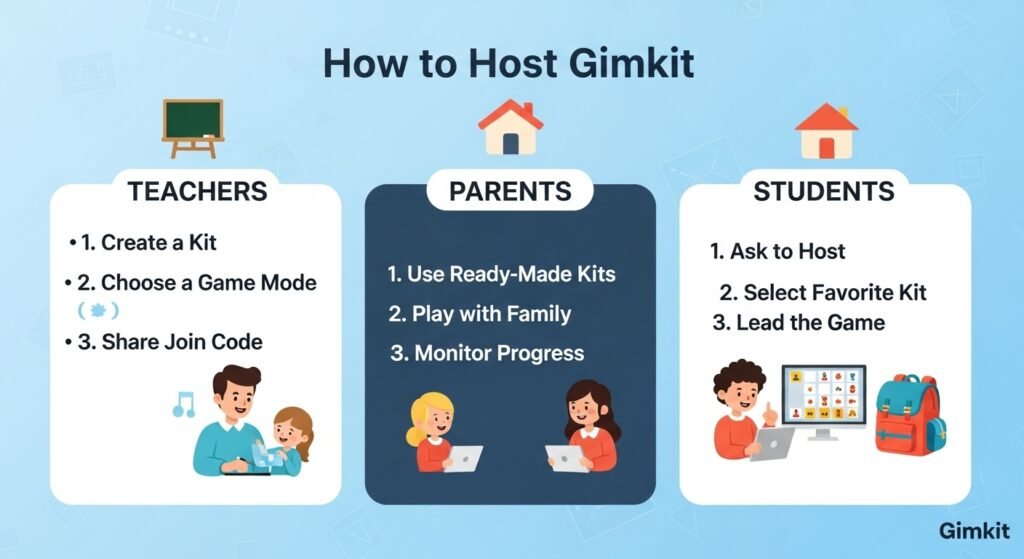
You don’t need a big classroom to host Gimkit. In fact, it’s perfect for small homeschool groups or family time. Parents can use Gimkit to quiz kids on spelling words, science facts, or fun trivia. Siblings can compete in teams or solo mode. Best of all, you don’t need to sit over their shoulders. Once the game starts, Gimkit runs smoothly and gives you a report of player performance afterward. It’s a wonderful tool to make study time more inviting at home. Hosting Gimkit can turn rainy afternoons into a thrilling learning adventure.
Can You Host Gimkit Without a Pro Account?
Yes! You can host Gimkit for free using the basic plan. The free version gives you access to Classic mode (solo or teams), plus a limited version of a few other modes that change monthly. While the full game list is available with the Pro version, there’s still plenty to enjoy for free. Many teachers use the free version year-round with great success. If you want access to more data, unlimited games, and custom uploads (like adding images or audio to questions), consider upgrading. But to start, the free level is more than enough to learn the ropes and begin hosting.
Tips for Hosting a Smooth Gimkit Session
When you host Gimkit, it helps to have a few tips in your pocket. First, test the game yourself before class—know the questions and how the mode works. Next, keep game sessions short at first (5–10 minutes) to build understanding and excitement. Always check that all students can access the game and understand how to answer. Have a few extra devices ready in case someone’s tech acts up. During the game, walk around or encourage questions when needed. Talk about the answers afterward to reinforce learning. These small steps help make your Gimkit hosting experience fun for everyone.
Using Your Own Content in Gimkit
You can create your own custom kits when you host Gimkit. Simply click “New Kit,” add a title, and start writing your questions. You can include multiple choice or text-entry options. Add images or audio if you’re using Gimkit Pro. You may also import question banks from spreadsheets or use pre-made templates. Teachers love creating custom kits for weekly quizzes, language vocabulary reviews, or math fact drills. Even students can build kits as part of their assignments. It’s a meaningful way to review because learners are involved in both playing and building the content.
Tracking Progress When You Host Gimkit
One great feature when you host Gimkit is the built-in reports. After each game, you can see exactly how each player did. It shows right answers, wrong answers, and total earnings. This gives teachers and parents clear insights into what kids know and where they might need help. These reports are saved in your account for review later. You can use the data to guide your next lesson, regroup teams, or give shout-outs to top improvers. It’s a helpful way to connect playtime to real learning goals without making it feel like a test.
Hosting Gimkit Games Remotely
Gimkit isn’t just for in-person play—you can host Gimkit remotely, too! Start your game as you would normally. Then, send the join link or game code through email, chat, or an online classroom dashboard. Use Zoom or Google Meet to share your screen and talk with students or friends while the game runs. It’s great for online classes, remote tutoring, or virtual clubs. Even with students in different places, Gimkit keeps everyone connected and engaged. It’s fun to watch reactions as scores climb and answers race across the screen.
Encouraging Teamwork with Gimkit
Some Gimkit modes let you split players into teams, which is fun and promotes teamwork. When you host Gimkit in “Team Mode” or “Team-Based Classic,” kids work together to earn points and win the game. It teaches collaboration, communication, and trust. Teachers love it because it brings students of all levels together. Even weaker players contribute when combined with stronger peers. This builds confidence and community. You can change up teams each round to keep things fresh. Hosting team games is also great for large classes or friendly competitions across grades.
Real Stories from Teachers Who Host Gimkit
Many teachers who host Gimkit share amazing stories. Mrs. Lopez from Texas says, “My class loved Gimkit so much, they begged for it during free time!” Mr. Carter, a middle school science teacher, said, “I’ve never seen my students so engaged. They remembered more from that one game than a full week of lectures.” Even first-year teachers say Gimkit helped break the ice. For students, hosting Gimkit doesn’t feel like homework—it feels like fun. These real-world stories show that hosting Gimkit is an easy, effective way to boost excitement and improve learning.
FAQs
1. What do I need to host Gimkit?
All you need is a free Gimkit account, a quiz (called a Kit), and devices for players to join.
2. Can students play without accounts?
Yes, students join games with a code at gimkit.com/join. No student accounts are required.
3. Is it safe for younger children to play Gimkit?
Yes, Gimkit is designed for education and has teacher-controlled settings. Always monitor play and settings for younger kids.
4. Can I use Gimkit for subjects other than math and science?
Absolutely! You can make or find Kits for language arts, social studies, foreign languages, or even just fun trivia.
5. Do I need the paid version to host Gimkit?
No. You can host several game modes for free. However, Gimkit Pro offers more features and game types.
6. Can I host Gimkit outside of school settings?
Yes! Anyone can host Gimkit—from parents and tutors to classrooms, clubs, camps, and community groups.
Final Thoughts
If you’re looking for a way to make learning more interactive, there’s no better time to host Gimkit. It’s simple to set up, truly fun to play, and powerful for helping kids (and adults) learn. Whether you’re a teacher leading a review session, a parent helping with homework, or a coach running a team challenge, Gimkit brings learning to life. It’s not just about getting answers right—it’s about making the journey exciting.
So why not give it a try? Find or build a quiz, pick a game mode, host Gimkit, and watch your students or kids light up with engagement. You’ll laugh, learn, and maybe even dance—all while studying. Now that’s a game worth playing!